
← Help Center · Vehicle management
Create a new fleet in Vialumina
This guide shows how to create and configure a new fleet in Vialumina. You enter basic information, assign a manager and link vehicles to the fleet.
Step 1 – Go to Fleets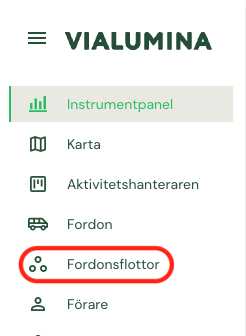
- Go to Fleets in the menu on the left.
Step 2 – Add a fleet
- Click the Add fleet button in the top right corner.
Step 3 – Fill in information
- Enter a name, description and start date, and assign a Fleet Manager.
- Click Create to save the new fleet.
Step 4 – Open the Vehicles tab
- Go to the Vehicles tab.
Step 5 – Add a new vehicle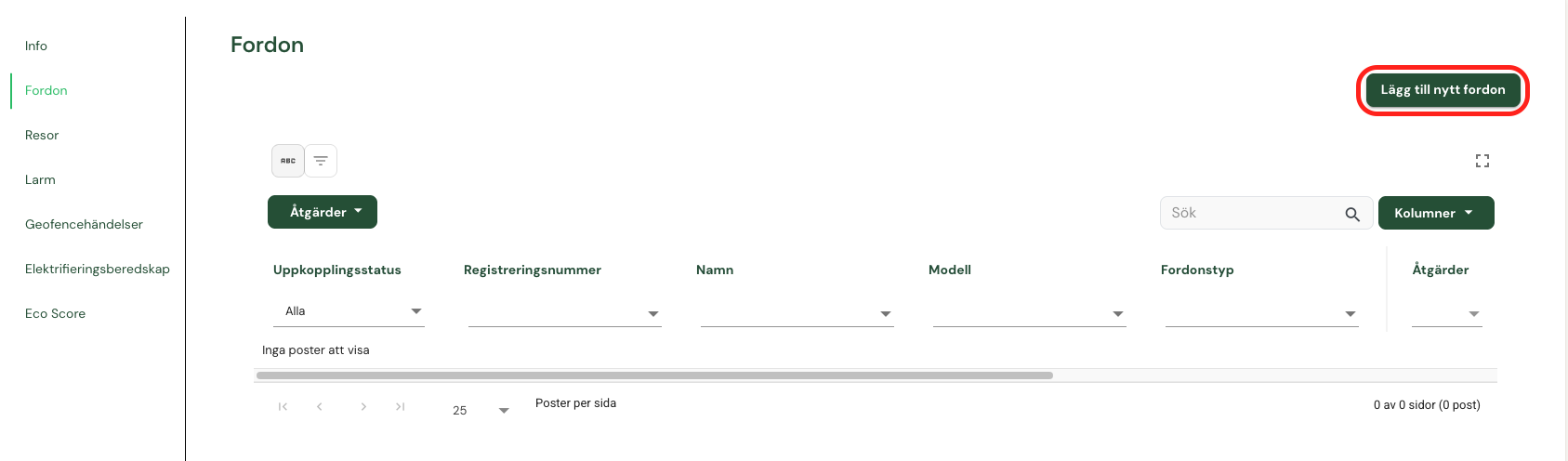
- Click the Add new vehicle button.
Step 6 – Select vehicle and create
- Select the vehicle from the list and click Create.
- The vehicle now appears in the fleet’s list.
Not using Vialumina yet? See how mileage logs, vehicles and charging work together in one system.
Book a demo