
← Help Center · Incidents & driving behaviour
Analyse driving behaviour in Vialumina GO
This guide shows how to use the Driver behaviour feature in Vialumina GO to analyse driving style and follow progress over time. You learn to interpret weekly summaries, review details such as acceleration and braking, and identify areas for improvement.
1. Main menu & driving behaviour
00:00 – Open Driver behaviour

- The main menu gives you an overview of the app’s features.
- To analyse your driving, tap “Driver behaviour”.
2. Weekly overview
00:02 – Weekly overview
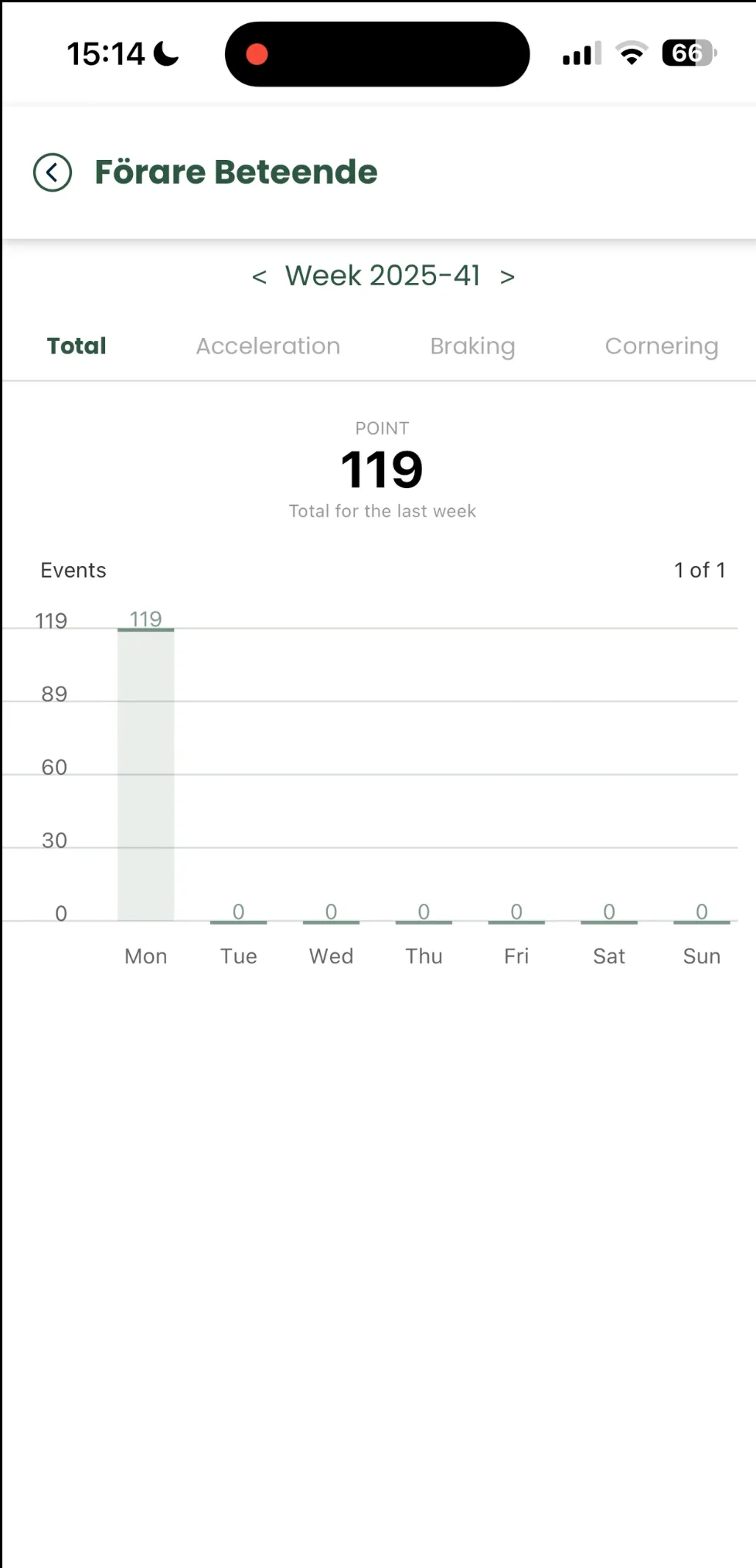
- You now see a summary (Total) of your driving scores for the current week.
00:05 – Browse between weeks

- Use the arrows at the top to easily browse between weeks and see your history.
3. Detailed analysis
00:07 – Detail view

- Tap the different tabs to review specific parts of your driving:
- Braking
- Acceleration
- Cornering
4. Compare over time
00:13 – Weekly comparison
- In the detail view you can also browse between weeks to see trends and compare your behaviour over time.
- 00:16 – Go back to Total to see the combined score for the selected week.
5. Go back
00:18 – Back to the main menu

- Tap the arrow in the top left to return to the main menu at any time.
Next steps in the app:
Not using Vialumina yet? See how mileage logs, vehicles and charging work together in one system.
Book a demo